

Español · Deutsch · Français · Italiano · Nederlands · Português
This sendpulse review covers what SendPulse offers, based on the features official pages confirm. I separate verified features from claims I could not confirm, so you know what to test before you pay.
Key Takeaways
- Scope: SendPulse bundles email, chatbots, websites, live chat, CRM, and an LMS in one account.
- Free limits: The free email plan caps at 500 subscribers and 15,000 emails per month.
- Verify first: Test deliverability, LMS limits, and current pricing yourself, since official sources don’t confirm them.
Check the current offer of SendPulse
sendpulse review: Multichannel Platform Scope and Verified Features
SendPulse is a multichannel marketing platform, not just an email sender. It bundles email marketing, Automation 360, chatbots, website builders, pop-ups, live chat, a CRM, and an LMS into one account. For a small team, that consolidation can replace several separate subscriptions.
Official SendPulse pages confirm the core pieces: email campaigns, chatbot building, website creation, website live chat, CRM, and online learning tools. Those are the features I treat as verified in this sendpulse review. Anything outside that list stays unconfirmed until you test it yourself.
Integrations and developer access
Technical buyers get API and webhook access, which opens the door to custom workflows. Five named integrations connect the platform to other tools: Make, Zapier, WordPress, Shopify, and Creatio. If your store runs on Shopify, start there and map one welcome sequence before you build anything larger.
If your site runs on WordPress, settle your hosting first. Our Hostinger review walks through that choice.
Support and analytics
Support runs 24/7 through live chat and email, which matters when a campaign
sendpulse review of Pricing: Free Plan Limits and Paid Tiers
The free email plan is the simplest place to start. It covers up to 500 subscribers and 15,000 emails per month, and it lists no time limit. A small list can run on it indefinitely, as long as you stay under both caps. Once your list passes 500 contacts, you need a paid plan, even if your monthly volume stays low.
Paid plans come in three tiers: Standard, Pro, and Enterprise. All three offer unlimited sending, so the real difference lies in sender addresses and authenticated domains. Standard allows 100 sender addresses and three authenticated domains. Pro raises that to 300 senders and five domains. Enterprise removes both limits.
Email pricing is separate from CRM, chatbots, and websites. If you plan to use more than one of these, the bundle calculator combines them into a single estimate. I suggest running email alone and the bundle side by side before you choose. That comparison shows whether the extra tools earn their cost or sit unused.
Transactional email over SMTP has its own free tier. It includes 12,000 emails per month, 50 messages per hour, and two sending domains. The hourly cap usually matters more than the monthly one. A flash sale can trigger hundreds of order receipts in one afternoon, so plan for that ceiling before launch.
Prices shift with billing period, volume, and features. Check the live pricing page right before you publish this sendpulse review or sign up. If you host your site elsewhere, compare the website add-on against a dedicated option such as Hostinger review before you bundle.
SendPulse Email Marketing and Automation 360 Flows
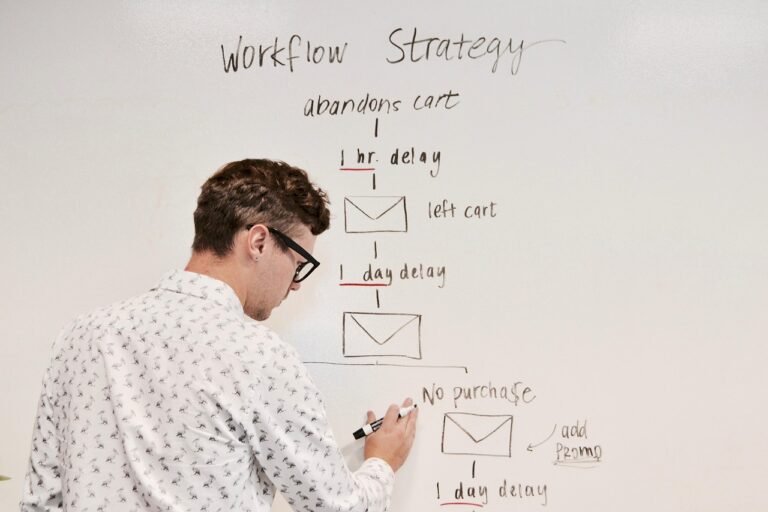
This sendpulse review starts with the free email plan, which gives you five automated flows with up to 50 elements each. That’s enough room for a welcome series, an abandoned-cart reminder, and a re-engagement sequence. Add more than 140 editable templates and a drag-and-drop builder, and the setup work drops fast.
Getting contacts in takes little effort. You can import TXT, CSV, XLS, and XLSX files, then place subscription forms on your site to capture new sign-ups. Open and click-through analytics show which messages people read and which links they click.
Automation 360 handles email workflows and related customer communications. Its main draw is reach, since automation spans email, chatbots, websites, CRM, and live chat within one ecosystem. A chatbot conversation and an email sequence can react to the same contact, so you won’t need to stitch tools together yourself. If your site runs on a shared host, my Hostinger review explains what to check first.
Where the free plan stops
Advanced automation requires a paid plan in the relevant email, CRM, or chatbot product. The free tier covers the basics, so the real limit depends on which product you use. If you only send newsletters, the free flows may be enough for now.
Deciding between free and paid
In this sendpulse review, the choice comes down to three questions. How many flows will you run at once? Do you need more than one event trigger? Will you connect a CRM or an outside app? The free plan stops at five flows and one event, so any yes answer points toward a paid tier. I’d check the pricing page before planning an integration, because API
SendPulse Chatbots, Websites, Live Chat and CRM Limits
The free Basic plan lets you run up to three chatbots, store 500 subscribers, and send 10,000 messages per month. In this sendpulse review, that’s enough to test one sales flow before you spend anything. Once you reach 500 subscribers, though, you’ll need to decide whether your growth justifies a paid plan.

Paid plans offer unlimited monthly messages and chatbots. A Standard chatbot plan adds up to three AI agents and 1 GB of file storage. If you’re comparing AI assistants for a small team, this best AI tools for small business guide shows how agents stack up against other options.
Websites and Live Chat
The website builder creates landing pages, full websites, and online stores without code. Pop-ups sit on those pages and push email addresses into your contact lists. You’ll also need hosting, and my Hostinger review covers that side of the setup.
Live chat can send automated messages when a visitor does something specific, like viewing your pricing page. Those conversations link to email, chatbots, and the CRM, so one chat can feed the rest of your funnel. Start with one trigger, then check the results before adding more.
CRM Limits and Team Size
The CRM organizes customer data and sales pipelines across Free, Standard, Pro, and Enterprise tiers. Seat limits decide how far a team can grow inside it. One tier allows up to 50 team members, and another allows up to 100.
Count only the people who will edit deals or contacts, not everyone in the company. Match that number to a tier before you commit. Fixing a messy pipeline later costs more time than choosing the right tier now.
SendPulse LMS, Mailchimp and Brevo Comparisons, and Review Limits
What the LMS Listing Confirms
The official SendPulse Features page lists a learning management system among its products. That confirms the LMS exists as a feature. It does not confirm how many courses you can build, how many students you can enroll, or whether certificates and assessments are included. Those details are missing from the sources I checked, so I won’t guess at them. If you plan to run online courses, ask SendPulse directly about limits before you commit.
Comparing SendPulse with Mailchimp and Brevo
SendPulse’s verified scope groups email with chatbots, websites, CRM, live chat, and LMS in one account. That breadth is the clearest point of difference I can document. Whether it is cheaper, more powerful, or better than Mailchimp or Brevo is opinion, because official sources do not settle those questions. Compare the Pricing pages of each vendor side by side, using your actual contact count and the features you need.
A small team might start with email and a chatbot, then add CRM later. The email, CRM, and transactional email pricing pages are separate, so add up the plans you would really use. If you also need hosting, read the Hostinger review. For chatbot alternatives, see this AI tools for small business roundup.
The sources do not verify deliverability rates, customer satisfaction, uptime, conversion rates, or ease of use. A feature listed on a page tells you the tool exists, not that it performs well. Use this sendpulse review as a starting point, not a verdict. Send a test campaign to your own list, and check whether the LMS or chatbot does what you need before you move your data.
Check the current offer of SendPulse
Sources: sendpulse.com/pricing, sendpulse.com/knowledge-base/email-service/sendpulse-basics/, sendpulse.com/pricing/feed.md, sendpulse.com/pricing/bundle.
Disclosure: some links in this article are affiliate links. If you buy through them, I may earn a small commission at no extra cost to you. As an Amazon Associate I earn from qualifying purchases.
Read next
 Luggage Set: 9 Essential Checks Before You Buy (2026 Guide)Updated 25 Nov 2026
 aweber review: 500-Subscriber Free Plan, Pricing & LimitsUpdated 26 Nov 2026
 ClickFunnels Review 2026: Honest Pricing, Plans, Pros and ConsUpdated 26 Nov 2026
More guides from the Business & Tools Desk
Get our free Subscription & Bill Cancellation Tracker
Sign up for our weekly email and download the tracker for free: list every subscription, see what it costs you per year, get a renewal calendar and ready-to-send cancellation letters. One short email a week with our latest guides. No spam; unsubscribe with one click.